NVR demo
The NVR demo is a sample network video recorder built with this framework. It records all registered RTSP cameras while showing up to 16 of them on the desktop, and runs person and vehicle detection and tracking on the cameras being displayed. Recordings can be played back from a timeline, and if you prepare a native embedding model, you can also search for people by text or image.
Screen layout
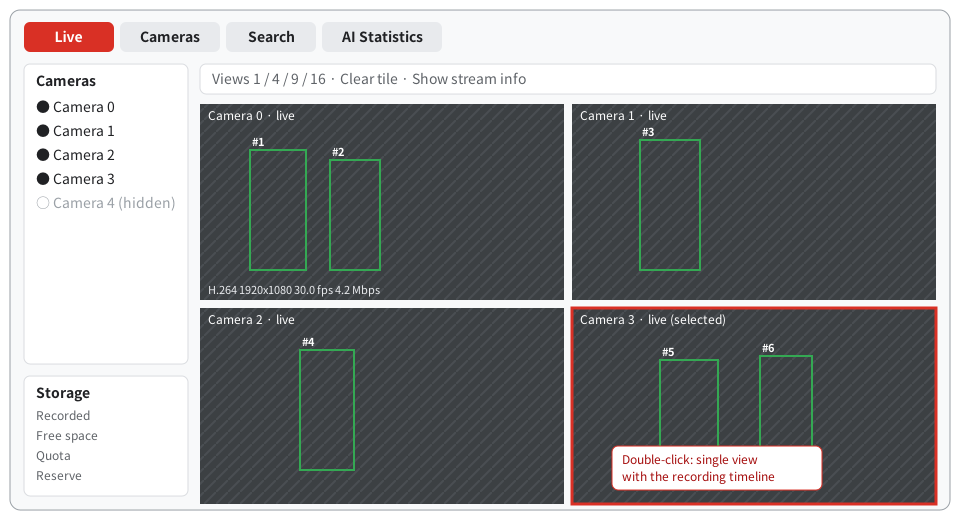
| Tab | What you can do |
|---|---|
| Live | Assign cameras to tiles in 1-, 4-, 9- or 16-way splits and view them. Bounding boxes and tracking IDs are drawn as an overlay |
| Search | Search for people by text, an image region, or attributes such as clothing (requires separate setup) |
| AI Statistics | Opens in Simple view: four cards with a one-minute trend for video decode, GPU AI inference, NPU AI inference and person tracking. Detailed view shows inference processing time, detection frequency and queue status |
| Cameras | Add, edit and delete cameras, set the recording retention period and delete recordings |
Double-click a tile to switch to single view, where you can play back recordings from the vertical timeline on the left.
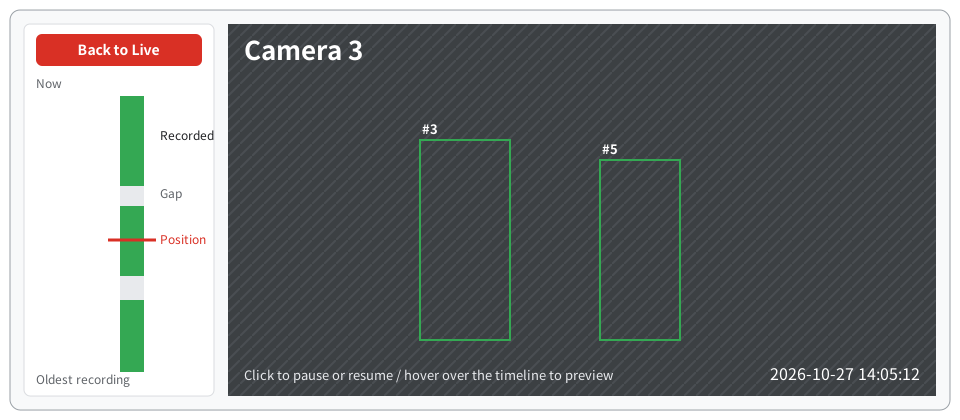
Click a green segment on the timeline to start playback from that time; hover over it to see a preview of that time. Back to Live returns to the live view. Cameras that are not displayed continue recording.
Launch
Complete the Installation first, and work in a shell where you have run source scripts/env.sh. A desktop (Wayland or X11) and OpenGL ES 3 on the AMD GPU are required.
1. Prepare the model
Using the same steps as the Quick start, also create a model with batch size 4.
mkdir -p artifacts/nvr
curl -fsSL -o artifacts/nvr/yolov8n.pt \
  https://github.com/ultralytics/assets/releases/download/v8.3.0/yolov8n.pt
PATH="$PWD/build/src/gst:$PATH" .deps/model-export/bin/python \
  examples/nvr/scripts/export_nvr_model.py artifacts/nvr/yolov8n.pt artifacts/nvr/nvr-model --batch=4
This step succeeded if yolov8n-b4.mxr, yolov8n-b1.mxr and model-info.json appear in artifacts/nvr/nvr-model/.
2. Prepare cameras
If you have no RTSP cameras, the bundled amdva-rtsp-files can serve video files in place of cameras. It assigns one URL per file and loops back to the start when it reaches the end of a file. Run it in a separate terminal and keep it running while you use the demo.
build/examples/rtsp-files/amdva-rtsp-files --port 8558 \
  artifacts/quickstart/bus.h264 artifacts/quickstart/out.mp4
It succeeded if rtsp://127.0.0.1:8558/cam0 and rtsp://127.0.0.1:8558/cam1 are printed. Input must be H.264 or H.265 video that is progressive, 8-bit and 2560×1440 or smaller.
3. Create a configuration file
Create artifacts/nvr/nvr-local.json with the following content. Paths are relative to the configuration file.
{
  "model": "nvr-model/yolov8n-b4.mxr",
  "single_model": "nvr-model/yolov8n-b1.mxr",
  "model_info": "nvr-model/model-info.json",
  "recording_root": "nvr-recordings",
  "sources": [
    {"id": "cam0", "name": "Camera 0", "uri": "rtsp://127.0.0.1:8558/cam0", "selected": true},
    {"id": "cam1", "name": "Camera 1", "uri": "rtsp://127.0.0.1:8558/cam1", "selected": true}
  ]
}
You can also add cameras from the Cameras tab after launch. Changes are saved to the configuration file.
4. Launch
WAYLAND_DISPLAY=wayland-0 QT_QPA_PLATFORM=wayland-egl \
  build/examples/nvr/amdva-nvr artifacts/nvr/nvr-local.json
On an X11 desktop, specify QT_QPA_PLATFORM=xcb. It succeeded if a window opens and bounding boxes and IDs appear on the video from the two cameras. Recordings are saved to artifacts/nvr/nvr-recordings/.
Each launch deletes previous recordings in that directory. Move any recordings you want to keep to another location before launching.
Run headless
amdva-streams uses the same configuration file and performs only ingest, recording and detection. It runs without a display and prints its status as JSON every second.
build/examples/nvr/amdva-streams artifacts/nvr/nvr-local.json 20
It runs for 20 seconds, and it succeeded if the last line is {"live":2,"recording":2,...}.
Person search
Person search uses the external EmbeddingGemma 2 runtime or the optional in-process MobileCLIP2 runtime built in this repository. To group search results into one card per person, you also need a ReID model (OSNet). For setup steps and settings, see Person search.
How it works
The NVR demo combines parts of this framework, standard GStreamer elements and an implementation of its own. The following figure shows how camera video is processed and which hardware runs each step. For the hardware, see "Ryzen AI APU hardware" in Concepts. Embedding for person search is shown for the setting that computes MobileCLIP2 on the NPU ("embedding_model": "mobileclip2-s2", "mobileclip_backend": "npu").
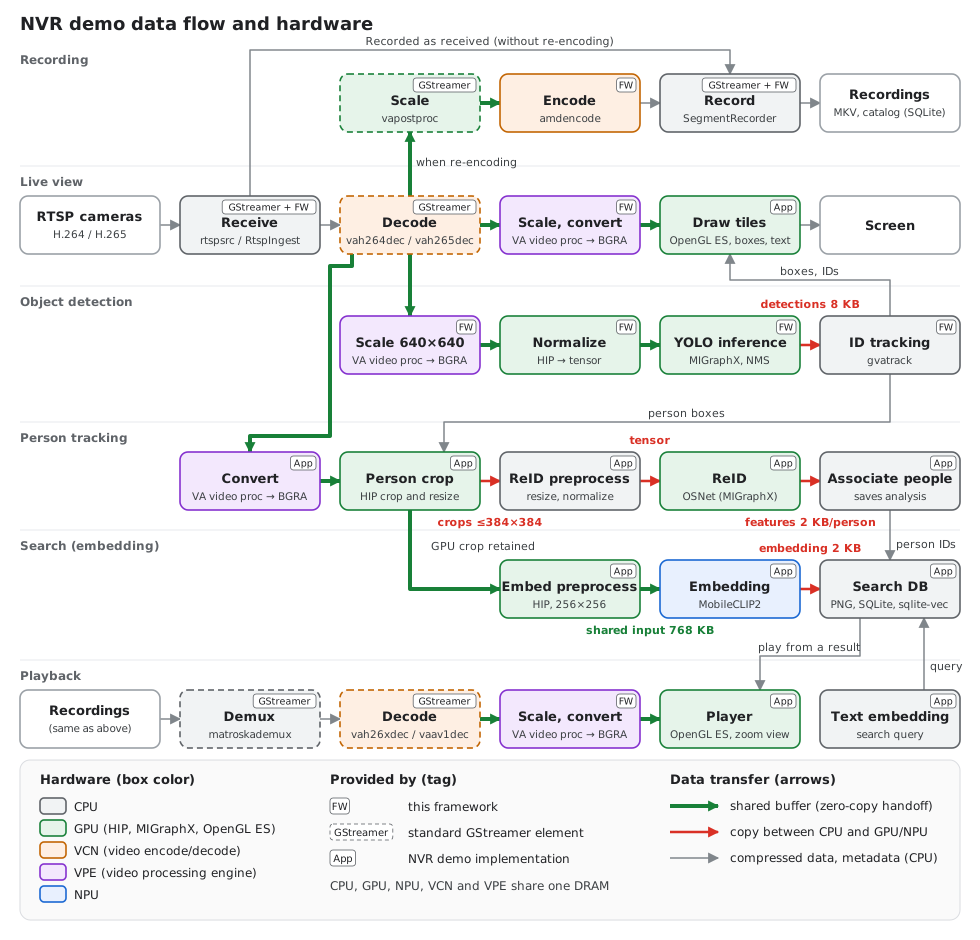
Click the figure to enlarge it. MobileCLIP green arrows cover application input handoff to the EP; copies and conversions inside the EP are outside the verification scope. Box colors show the hardware that runs the step, and the tag at the top right shows who provides the part. Arrow colors show how data is passed: green shares the same buffer (zero-copy), red is a copy between the CPU and the GPU or NPU, and gray is compressed data or metadata in CPU memory.
Reception and recording: The CPU writes the received compressed data to MKV files as is. Because the video is not decoded, the load is small and cameras that are not on screen keep recording. For a camera set to re-encode its recording, the decoded video is scaled on the GPU and encoded on VCN before it is recorded (re-encoded recordings).
Live view and object detection: Video decoded by VCN never leaves GPU memory: VPE scales and converts it, and it is used for display (OpenGL ES) and object detection (HIP, MIGraphX). Only the detection results (8 KB per frame) return to the CPU, which uses them to assign IDs and draw the boxes.
Person tracking and search: Preprocessing for person features (ReID), saving images for search and handing data to the NPU run on the CPU, so this is where video is first copied to the CPU. What is copied is a small image (up to 384×384) of just the person, cropped and scaled on the GPU; whole frames are not copied. The ReID model runs on the GPU and the embedding model runs on the NPU from a separate process. Text embedding for search queries and vector search run on the CPU.
Playback: The CPU reads the recording file; from there on, data passes between VCN, VPE and the GPU with zero-copy, as in the live view.
| Step | Hardware | Data transfer | Provided by |
|---|---|---|---|
| RTSP reception | CPU | Compressed data (CPU memory) | GStreamer rtspsrc and the framework's RtspIngest |
| Recording | CPU | Written as compressed data | GStreamer splitmuxsink and the framework's SegmentRecorder, Catalog |
| Decoding | VCN | Video output to GPU memory (NV12) | GStreamer vah264dec, vah265dec |
| Scaling and color conversion for display | VPE | Zero-copy | Framework |
| Display, drawing boxes and text | GPU (OpenGL ES) | Zero-copy | NVR demo |
| Scaling to the inference input | VPE | Zero-copy | Framework |
| Normalization, inference (YOLO), box selection | GPU (HIP, MIGraphX) | Zero-copy; only detection results are read back to the CPU (8 KB) | Framework |
| ID assignment | CPU | Metadata only | Framework (gvatrack) |
| Person cropping | VPE, GPU (HIP) | Only the cropped image is copied to the CPU (up to 384×384) | NVR demo |
| ReID | CPU, GPU (MIGraphX) | Input copied to the GPU, features (2 KB per person) to the CPU | NVR demo |
| Associating people, saving analysis | CPU | — | NVR demo, the framework's Catalog |
| Embedding (MobileCLIP2) | GPU preprocessing, GPU/NPU inference | Shared input in one process; EP internals excluded from copy audit | NVR demo, MIGraphX, ONNX Runtime and Ryzen AI Software |
| Saving search images, vector search, text embedding | CPU | — | NVR demo, SQLite and sqlite-vec |
| Re-encoding | GPU (scaling), VCN | Zero-copy; only compressed data goes to the CPU | The framework's Transcoder and amdencode, GStreamer vapostproc |
| Playback, timeline previews | CPU (reading), VCN, VPE, GPU | Zero-copy after reading | The framework's PlaybackSession, GStreamer matroskademux |
"Framework" means this repository's GStreamer plugins and SDK libraries (Using the SDK); "NVR demo" means the implementation in examples/nvr. Inference uses MIGraphX, and inference on the NPU uses ONNX Runtime and Ryzen AI Software. With the default EmbeddingGemma 2, or with MobileCLIP2 on the GPU, embeddings are also computed on the GPU. For the detailed structure, see the NVR developer information.
Further reading
- Settings, processing architecture, validation results: NVR developer documentation
- Screen operations and recording management: Desktop video management
Move the prepared 1440p demo to another environment
For artifacts/1440p-demo, use the Git-managed templates and migration guide. Launch/configuration/layout files stay in Git while models and videos are exported separately. Generate local settings using destination paths instead of retaining the source machine's absolute config paths. NPU caches also contain internal absolute paths and SDK dependencies, so reprepare and validate them on the destination.